
When I'm coding, I prefer light text on dark background. White page will burn my eyes faster. So if you are in the same boat as me, this post might make your day!
Warning: Backup your style first (if any)!
Tips: Please click each screenshots to get the full view.
Tips: Please click each screenshots to get the full view.
Adobe Dreamweaver CS3
Operating System: Windows XP | Font used: Consolas*.


Download
How to use?
Replace the Colors.xml in C:\Documents and Settings\USERNAME\Application Data\Adobe\Dreamweaver 9\Configuration\CodeColoring with the file you download.
Aptana Studio
Operating System: Ubuntu Linux | Font used: Bitstream Vera Sans Mono.

Download
How to use?
In Aptana menu, go to Window --> Preferences. Then you get a window with lots of options in the left. Choose Aptana --> Editors --> CSS or HTML or JavaScript --> Colors.
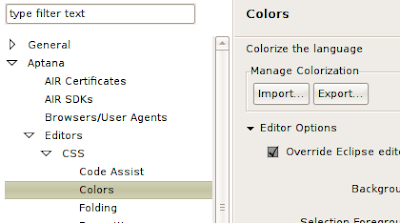
Then you just use the import function on your right. Just make sure you import the right .col file to the right Colors section.
Notepad++
Operating system: Windows XP | Font used: Consolas.


Download
How to use?
Replace the stylers.xml in C:\Program Files\Notepad++ with the file you download.
---
* When I use Dreamweaver in Linux, the best programming font for me is Bitstream Vera Sans Mono.
¶ Continue reading »


 Hello there. This blog will be focusing on manything geeky and something personal.
 You can subscribe to this blog by using this


